2015年5月15日金曜日

CentOS7 におけるローカル日時への変更

ご無沙汰しております。約3年ぶりの投稿らしいです。

さて、本題です。 

はじめに

CentOS7 の 日付を確認します。

(1) 現在時刻を確認

$ date 2015年 5月 15日 金曜日 22:18:47 EDT 

⇒ EDT アメリカ東部夏時間

(2) ローカルタイムの確認

/etc/localtime -> ../usr/share/zoneinfo/America/New_York

⇒ America/New_York

EDT から JST(日本標準時) に変更する手順について説明します。他のローカル日時に変更する時にも応用出来ます。その時にもサポートされているローカルタイムを調べ、設定し確認するという手順は共通です。

timedatectl

CentOS7以降で対応されたシステムの時間と日付を管理・設定するコマンドです。 このコマンドを使用してTimezoneの設定を行います。

(1) サポートされている TimeZone を調べます。

JST に設定しますので Asiaに絞って検索をします。

$ timedatectl list-timezones |grep Asia

Asia/Tehran
Asia/Thimphu
Asia/Tokyo ← これを使う
Asia/Ulaanbaatar

 3) TimeZone を 設定します。

$ timedatectl set-timezone Asia/Tokyo

日付の確認


(1) timedatectl のLocal time と  Timezoneを確認します。

$ timedatectl

Local time: 金 2015-05-15 14:18:01 JST ← JSTである事を確認
Universal time: 金 2015-05-15 05:18:01 UTC
Timezone: Asia/Tokyo (JST, +0900) ← JSTである事を確認
NTP enabled: n/a
NTP synchronized: no
RTC in local TZ: no
DST active: n/a

(2) date コマンドで現在の日付を確認します。

$ date
2015年  5月 15日 金曜日 14:22:45 JST ← JSTである事を確認

(3) ローカルタイムの確認

$ ls -l /etc/localtime

/etc/localtime -> ../usr/share/zoneinfo/Asia/Tokyo ← Asia/Tokyoである事を確認


14:31 2 comments

2012年6月20日水曜日

Problem "root lost privileges"


http://www.jimhermann.com/ensim/index10811.htm

http://www.cyberciti.biz/faq/mysql-change-root-password/
19:26 No comments

2012年6月14日木曜日

How to Reset the Root Password


運用の人が mysqlのroot のパスワードを伝えずにいなくなり、連絡しても無しのつぶてでスキーマが作れない という時に役立つかもしれません。

 原文 ⇒  How to Reset the Root Password

1.   MySQL サーバを停止します。


kill `cat /mysql-data-directory/host_name.pid`


ps ax |grep mysqld で --pid-file を確認するのも一つの方法です。


/usr/libexec/mysqld --basedir=/usr --datadir=/var/lib/mysql --user=mysql --pid-file=/var/run/mysqld/mysqld.pid --skip-external-locking --socket=/var/lib/mysql/mysql.sock


2.   ~/mysql-init に 下記を記入し保存します。


SET PASSWORD FOR 'root'@'localhost' = PASSWORD('MyNewPassword');


※ このファイルはパスワードの再設定が完了したら削除して下さい。


3.   MySQL サーバを再起動します。

僕の環境では駄目でした。手順書にある第二の方法を試しました。

1.   MySQL サーバを停止します。

2. mysqld にオプションを付けて実行します。

mysqld_safe --skip-grant-tables --user=root

3. mysql -uroot で MySQLのクライアントに入ります。

4. パスワードを変更します。


mysql> UPDATE mysql.user SET Password=PASSWORD('newpwd')
    ->                   WHERE User='root';
mysql> FLUSH PRIVILEGES;

5. MySQL サーバを再起動します。


/etc/rc.d/init.d/mysqld start


11:05 No comments

2012年3月28日水曜日

第58回PHP勉強会@東京 に参加した

第58回PHP勉強会@東京に参加した。毎回気づいた時にはいっぱいだったり時期が過ぎていたりで参加は初めてとなりました。発表者だけでなく 全員が自己紹介するのも新鮮でした。人数が30 人という比較的少人数だから出来る業かもしれませんが、心の準備をしておらずドキドキしてしまいました。 感想は別に書くとして 発表された資料を 纏めておきます。 (発表順)

PHP と MySQL でカジュアルに MapReduce する

Phakeで簡単モックオブジェクト作成

入門 PHP 5.4

14:46 2 comments

2012年3月19日月曜日

PHP Fog に SOY CMS2をインストール

基本的にPHP Fog へのインストールは 他の共用サーバと同じ様な手順で行う事が出来ます。
ドキュメントルート は ****.phpfogapp.com であり、ファイルのアップロード(デプロイ)は git を使用します。


SOY CMS2を新規インストールする手順

  1. 動作環境を満たしたサーバーを準備する※1
  2. SOY CMS2インストールファイルをダウンロードする
  3. インストールファイルをサーバーへアップロードする
  4. インストールウィザードに従ってインストールを進める

※ SOY CMS2 をインストール するより引用


1. github から SOY CMS2 を PHP Fog のアプリケーションの中にダウンロードする。


# cd ****.phpfogapp.com
# git clone git@github.com:SOYCMS2-dev/SOYCMS2.git


2.  soycms 配下のファイルを ****.phpfogapp.com に移動する

# cd SOYCMS2/soycms
# move * ../../
# cd ../../
# rm -fr SOYCMS2

3.  PHP Fog にデプロイ(アップロード)する

# git add *

# git commit -m "soycmsを展開"
# git push

4.  SOY CMS2のインストールの設定

「サーバによってはドキュメントルートより上に設置する事も可能です」とありますが、PHP Fogの場合はデフォルト(soycms_config)以外には選択肢が無さそうです。

5. 初期管理者の追加

パスワードを設定します。「メールサーバの設定」 は PHP Fog に mail() が使えるとの記述があったので取りあえずデフォルトのままとし特に編集しませんでした 。


6. 初回ログイン

先ほど設定した管理者ID とパスワードを入力します。管理画面のテーマは ベースとなる色を変更する事が出来ます。試してみると理解出来ると思います。

7. サイトの作成

8. データベース種別

mysql を選択します。「Database Connection Info」に書かれている設定情報を参考にします。

次へを押すとエラーが発生しました。直接 サーバ上にディレクトリを作る方法(権限)が無い様です。
サイトを作成するには ローカルの環境で サイトまで作って git push し、mysql をリストアするしか方法は無さそうです。
別の機会に試してみます。今日はここまでとします。


11:57 1 comment

2012年3月12日月曜日

運用しているPHP のバージョンをアップデート

アップデートまでのいきさつ


開発からは7年ほど経過していますが、サーバ自体を去年入れ替えました。ただCentOS5の標準のPHPを使用したため PHPのバージョンは5.1.6 でした。

今まで問題はなかったのですが、Smarty3 にアップグレード した時に問題が発生しました。
具体的には escape 処理を使った時に出力した画面が真っ白になってしまいました。
Smarty3の継承機能が便利な事もあり、 escape が使用出来ない件に関しては目をつぶっていました。

ちょうど、新規開発をするタイミングもあり、原因を調査しようと考えました。
最初にescapeのソースを確認します。

smarty2

function smarty_modifier_escape($string, $esc_type = 'html', $char_set = 'ISO-8859-1')
{
    switch ($esc_type) {
        case 'html':
            return htmlspecialchars($string, ENT_QUOTES, $char_set);


smarty3

function smarty_modifier_escape($string, $esc_type = 'html', $char_set = null, $double_encode = true)
{
    if (!$char_set) {
        $char_set = Smarty::$_CHARSET;
    }

    switch ($esc_type) {
        case 'html':
            return htmlspecialchars($string, ENT_QUOTES, $char_set, $double_encode);


比較すると 関数 htmlspecialchars の double_encode が追加され 引数が異なっています。
double_encode は 5.2.3 からのサポートなのでこれが原因と考えられます。
必要条件には Smarty 3.x: PHP 5.2+ とあるのですが、5.2.3 以降を使用した方が良いかもしれません。

アップデートの手順

CentOS5での手順です。コマンドだけですが。。。

# cd /etc/yum.repos.d/
# wget http://dev.centos.org/centos/5/CentOS-Testing.repo
# yum --enablerepo=c5-testing update php
# httpd -k restart

Apacheの再起動をしないと Apacheモジュールとして動かしているPHP は 古いバージョンのままになります。

引き続き。。。

それはまた別の話。と書いていましたが、何日かして、Fatal error: Call to undefined function mcrypt_get_key_size() が発生しました。原因としては mcrypt のモジュールが存在しないという事のようです。確認してみます。

確認1. yum info php-mcrypt
Installed Packages
Name : php-mcrypt
Arch : x86_64
Version 5.1.6
を見るとインストールはされていますが Version が 5.1.6 と古い為にエラーが起きている様です。

確認2. php -v

#php -v

PHP Warning:  PHP Startup: mcrypt: Unable to initialize module  ← ここ
Module compiled with module API=20050922, debug=0, thread-safety=0
PHP    compiled with module API=20060613, debug=0, thread-safety=0
These options need to match
 in Unknown on line 0
PHP 5.2.10 (cli) (built: Nov 13 2009 11:44:05) 
Copyright (c) 1997-2009 The PHP Group
Zend Engine v2.2.0, Copyright (c) 1998-2009 Zend Technologies

確認の結果 mcrypt を アップデートする事に決めした。

google ます。

wget ftp://ftp.pbone.net/mirror/rpms.famillecollet.com/fedora/9/olds/x86_64/php-mcrypt-5.2.10-1.fc9.remi.x86_64.rpm

この辺は決まり文句。


rpm -e php-mcrypt-5.1.6-15.el5.centos.1.x86_64
rpm -i --nodeps php-mcrypt-5.2.10-1.fc9.remi.x86_64.rpm

確認。

#php -v


PHP 5.2.10 (cli) (built: Nov 13 2009 11:44:05)
Copyright (c) 1997-2009 The PHP Group
Zend Engine v2.2.0, Copyright (c) 1998-2009 Zend Technologies


# rpm -qa |grep php
php-5.2.10-1.el5.centos
php-devel-5.2.10-1.el5.centos
php-pear-1.4.9-6.el5
php-common-5.2.10-1.el5.centos
php-cli-5.2.10-1.el5.centos
php-gd-5.2.10-1.el5.centos
php-ldap-5.2.10-1.el5.centos
php-mbstring-5.2.10-1.el5.centos
php-pdo-5.2.10-1.el5.centos
php-mysql-5.2.10-1.el5.centos
php-mcrypt-5.2.10-1.fc9.remi

一つだけ、fc9.remi となっているのは気持ち悪いが バージョンは揃いました。

アパッチを再起動して確認 ! して画面が正常に表示されました。

英語のサイトですが

http://wiki.centos.org/HowTos/PHP_5.1_To_5.2

を参考にしました。


1:08 1 comment

2012年2月7日火曜日

Smmrty3 〜Smarty2との互換性がないアップグレード〜

原文ママ。その内訳すかも。newline at {if} tags は メールとかでここに改行を入れたく無いという時は個人的には邪魔です。


= Known incompatibilities with Smarty 2 =

Smarty 2 との良く知られている非互換性

== Syntax ==

Smarty 3 API has a new syntax. Much of the Smarty 2 syntax is supported
by a wrapper but deprecated. See the README that comes with Smarty 3 for more
information.

Smarty 3 API には 新しい シンタックスがある。

The {$array|@mod} syntax has always been a bit confusing, where an "@" is required
to apply a modifier to an array instead of the individual elements. Normally you
always want the modifier to apply to the variable regardless of its type. In Smarty 3,
{$array|mod} and {$array|@mod} behave identical. It is safe to drop the "@" and the
modifier will still apply to the array. If you really want the modifier to apply to
each array element, you must loop the array in-template, or use a custom modifier that
supports array iteration. Most smarty functions already escape values where necessary
such as {html_options}

== PHP Version ==
Smarty 3 is PHP 5 only. It will not work with PHP 4.

== {php} Tag ==
The {php} tag is disabled by default. The use of {php} tags is
deprecated. It can be enabled with $smarty->allow_php_tag=true.

But if you scatter PHP code which belongs together into several
{php} tags it may not work any longer.

== Delimiters and whitespace ==
Delimiters surrounded by whitespace are no longer treated as Smarty tags.
Therefore, { foo } will not compile as a tag, you must use {foo}. This change
Makes Javascript/CSS easier to work with, eliminating the need for {literal}.
This can be disabled by setting $smarty->auto_literal = false;

== Unquoted Strings ==
Smarty 2 was a bit more forgiving (and ambiguous) when it comes to unquoted strings
in parameters. Smarty3 is more restrictive. You can still pass strings without quotes
so long as they contain no special characters. (anything outside of A-Za-z0-9_)

For example filename strings must be quoted

{include file='path/foo.tpl'}


== Extending the Smarty class ==
Smarty 3 makes use of the __construct method for initialization. If you are extending
the Smarty class, its constructor is not called implicitly if the your child class defines
its own constructor. In order to run Smarty's constructor, a call to parent::__construct()
within your child constructor is required.


class MySmarty extends Smarty {
function __construct() {
parent::__construct();

// your initialization code goes here

}
}


== Autoloader ==
Smarty 3 does register its own autoloader with spl_autoload_register. If your code has
an existing __autoload function then this function must be explicitly registered on
the __autoload stack. See http://us3.php.net/manual/en/function.spl-autoload-register.php
for further details.

== Plugin Filenames ==
Smarty 3 optionally supports the PHP spl_autoloader. The autoloader requires filenames
to be lower case. Because of this, Smarty plugin file names must also be lowercase.
In Smarty 2, mixed case file names did work.

== Scope of Special Smarty Variables ==
In Smarty 2 the special Smarty variables $smarty.section... and $smarty.foreach...
had global scope. If you had loops with the same name in subtemplates you could accidentally
overwrite values of parent template.

In Smarty 3 these special Smarty variable have only local scope in the template which
is defining the loop. If you need their value in a subtemplate you have to pass them
as parameter.

{include file='path/foo.tpl' index=$smarty.section.foo.index}


== SMARTY_RESOURCE_CHAR_SET ==
Smarty 3 sets the constant SMARTY_RESOURCE_CHAR_SET to utf-8 as default template charset.
This is now used also on modifiers like escape as default charset. If your templates use
other charsets make sure that you define the constant accordingly. Otherwise you may not
get any output.

== newline at {if} tags ==
A \n was added to the compiled code of the {if},{else},{elseif},{/if} tags to get output of newlines as expected by the template source.
If one of the {if} tags is at the line end you will now get a newline in the HTML output.


== trigger_error() ==
The API function trigger_error() has been removed because it did just map to PHP trigger_error.
However it's still included in the Smarty2 API wrapper.

== Smarty constants ==
The constants
SMARTY_PHP_PASSTHRU
SMARTY_PHP_QUOTE
SMARTY_PHP_REMOVE
SMARTY_PHP_ALLOW
have been replaced with class constants
Smarty::PHP_PASSTHRU
Smarty::PHP_QUOTE
Smarty::PHP_REMOVE
Smarty::PHP_ALLOW
14:29 No comments

2012年1月26日木曜日

PDO

接続

文字コードの設定

try {
$pdo = new PDO($db_dsn,$db_user, $db_password,
array(
PDO::MYSQL_ATTR_INIT_COMMAND => "SET CHARACTER SET `utf8`"
)
);
} catch (PDOException $e) {
die($e->getMessage());
}

推奨されないらしい

$pdo = new PDO(
'mysql:host=hostname;dbname=defaultDbName',
'username',
'password',
array(PDO::MYSQL_ATTR_INIT_COMMAND => "SET NAMES utf8")
);

持続的な接続

検討中。

データベースサーバへの持続的な接続による恩恵をこうむる web アプリケーションは多いでしょう。持続的な接続は、スクリプトが 終了しても閉じられずにキャッシュされ、他のスクリプトが同じ内容の 接続を要求してきた際にそれが再利用されます。持続的接続の キャッシュにより、スクリプトがデータベースを使用するたびに 新しい接続を確立するオーバーヘッドを避けることができます。 それにより、結果として web アプリケーションを高速化できるように なります。

$dbh = new PDO('mysql:host=localhost;dbname=test', $user, $pass, array(
PDO::ATTR_PERSISTENT => true
));

今の所の接続案

$dbh = new PDO('mysql:host=localhost;dbname=test', $user, $pass, array(
PDO::MYSQL_ATTR_INIT_COMMAND => "SET CHARACTER SET `utf8`",
PDO::ATTR_PERSISTENT => true
));

参考

SET NAMESは禁止
8:49 2 comments

2012年1月21日土曜日

コマンド 備忘録

[Subversion] .svnファイルを一括削除する

rm -rf `find ./ -type d -name .svn ! -regex \.svn/. -print`

! -regex \.svn/. が ? いらないのでは。

echo rm -rf `find . -type d -name .svn`

find . -type d -name .svn -exec rm -rf {} \;

WEB制作者の苦悩

[Subversion] ブランチをスイッチしたもの(確認方法)

別のブランチの .svn をコピー したらこうなった。

svn stat | awk '$1 == "S"'

svn:ignore

svn propset svn:ignore target .
svn commit -m "Ignored target directory"

svn:ignoreを 再帰的に適用する


-R を使う。./tmp ディレクトリ以下の全てのファイルをバージョン管理から外す。

svn propset -R 'svn:ignore' '*' ./tmp/
15:50 No comments

2012年1月20日金曜日

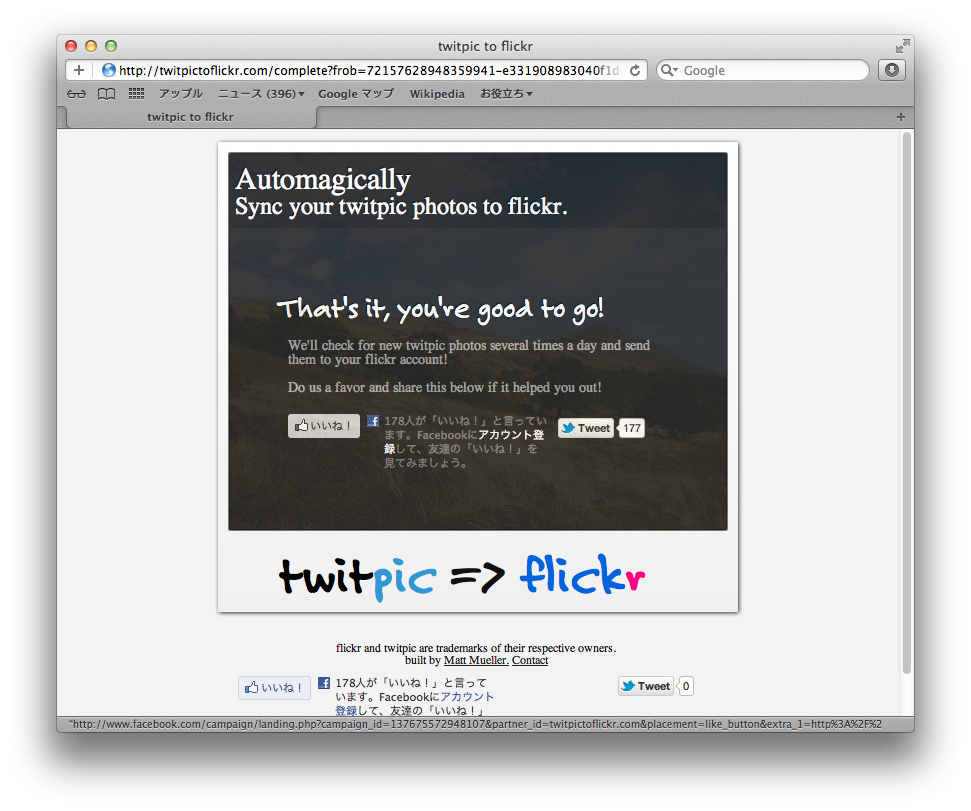
twipic と Flicker を連携する

1. メールアドレスを入力する


2. Twitter のアカウント名を入力


3. 同期

Send all existing photos to flickr?

4.

12:54 No comments

2012年1月2日月曜日

Twitter/xAuth

序. コンソールアプリとの発言で。。。

XAuthを薦められました。

結局 Twitter 社の認識としては コンソールアプリでやるんだから パスワードを使うXAuth でよくね。
という話らしい。その後食い下がってみたみたけど、返信が来ないのは話は終わりましたよという事か。
そう言う訳で XAutを使ってみました。

何を作ったかは後ほど

XAUth

xAuth provides a way for desktop and mobile applications to exchange a username and password for an OAuth access token. Once the access token is retrieved, xAuth-enabled developers should dispose of the login and password corresponding to the user.

xAuth access is restricted to approved applications. If your application is a desktop or mobile application and the standard web OAuth flow or PIN-code out-of-band flow is not right for you, send a detailed message to api@twitter.com to request xAuth privileges. Include the name of your application, the consumer key, the application ID (if available), and a summary of how xAuth is best-suited for your application.

11:05 1 comment

2011年6月19日日曜日

Smartyの継承について

PHPの開発を受けたり、お守り(運用)をしたりしているとcakePHP等のMVCモデルまではいかなくとも SmartyのViewだけでもあった方が良いなと思う事が多いです。直接PHPファイルに書いたり preg_replace を使って自前のテンプレートエンジンを使われたりすると、肝のソースコードに到達するまでに余計な時間が掛かります。

デザイン(マークアップ言語)は外に出そうよと強く思います。V(View) が別管理されているだけでも違います。

さて、Smartyの継承です。Smartyは各プロダクトで共通の設定をする方が設定が散逸せずに管理が楽です。

継承して使いたいと考え 先人を探して googleすると下記が引っかかりました。

Smartyの継承クラスを用意する

require_once("Smarty.class.php"); // smarty.class.phpの指定。環境によって異なります。
class xxxxSmarty extends Smarty{ // Smartyクラスを継承したxxxxSmaryクラスを定義します。
public function __construct(){    // __construct()はPH5以上です。
$this->Smarty();
$this->left_delimiter = "{!";    // xoopsと同じにする。(xoopsに慣れてるので)
$this->right_delimiter = "}";
$this->template_dir = "xxxxxxxx/templates";
$this->compile_dir = "xxxxxxxx/templates_c";
}
}

Uncaught exception 'SmartyException' with message 'Please use parent::__construct() to call parent constuctor'

のエラーが出た。parent::__construct() 親のコンストラクタを先頭で呼んで下さい。

色々あったのねという事で 下記に修正しました。(抜粋)

class SpnsSmarty extends Smarty{ 
    public function __construct(){
        parent::__construct();
        //$this->Smarty();
        $this->left_delimiter = "{{";    
        $this->right_delimiter = "}}";

テンプレートの継承も奇麗にヘッダーやフッターを分割出来るので是非機会があれば使ってみて下さい。本家のサイトが詳しいです。

テンプレートの継承
3:42 No comments

2011年4月18日月曜日

FTPの自動化あれこれ

1. シェルスクリプト 方式


(1) ftp -n

-n ユーザ名とパスワードを聞かれないようにする。
⇒ シェルスクリプトで実行出来るようにする。

$ vi ftp.sh
下記を入力する

---------
ftp -n hostname << ECHO
user userid password
bin
cd www
ls
ascii
bye
ECHO
---------
$ chmod 755 ftp.sh (2) echo "" | ftp -n
#!/bin/sh
echo "user userid password
ls
" | ftp -n hostname

2. wget (ダウンロードのみ) 方式

$ wget ftp://userid:password@ hostname/pass

3. ncftp 方式

ncftpget ncftp + get : ダウンロード ncftpget ncftp + put : アップロード インストール: yum install ncftp (1) ncftpget Usages:
  ncftpget [flags] remote-host local-dir remote-path-names...      (mode 1)
  ncftpget -f login.cfg [flags] local-dir remote-path-names...     (mode 2) ← 推奨?
  ncftpget [flags] ftp://url.style.host/path/name                  (mode 3)
  ncftpget -c [flags] remote-host remote-path-name > stdout        (mode 4)
  ncftpget -C [flags] remote-host remote-path-name local-path-name (mode 5)
  ncftpget -c [flags] ftp://url.style.host/path/name > stdout      (mode 6)
(2) ncftpput Usages:
  ncftpput [flags] remote-host remote-dir local-files...   (mode 1)
  ncftpput -f login.cfg [flags] remote-dir local-files...  (mode 2) ← 推奨?
  ncftpput -c remote-host remote-path-name < stdin         (mode 3)
  ncftpput -C remote-host local-path-name remote-path-name (mode 4)

注意:flags の -u -p はセキュリティ的に使用は推奨されない

(3) login.cfg
2:01 No comments

2011年4月11日月曜日

rubyとmysqlの接続

mysqlドライバのインストール


$ gem install ruby-mysql

接続テスト


require 'rubygems'
require 'mysql'


#db = Mysql.new("localhost", "username", "password","db")
db = Mysql.connect("localhost", "username", "password","db")

⇒ エラーが出なければOK。

undefined method `connect' for Mysql:Class (NoMethodError)
もしくは `initialize': wrong number of arguments (3 for 0) (ArgumentError)
が出る場合


- 確認

1. Mysql.methods でメソッドを確認

["private_class_method", "inspect", "yaml_as", "to_yaml_style", "name", "tap", "clone", "public_methods", "object_id", "__send__", "method_defined?", "instance_variable_defined?", "equal?", "freeze", "extend", "send", "const_defined?", "methods", "ancestors", "module_eval", "instance_method", "hash", "autoload?", "dup", "to_enum", "yaml_tag_read_class", "instance_methods", "public_method_defined?", "instance_variables", "class_variable_defined?", "eql?", "constants", "id", "instance_eval", "singleton_methods", "module_exec", "to_yaml", "yaml_tag_class_name", "const_missing", "taint", "instance_variable_get", "frozen?", "enum_for", "private_method_defined?", "public_instance_methods", "display", "instance_of?", "superclass", "to_yaml_properties", "method", "to_a", "included_modules", "const_get", "instance_exec", "type", "<", "protected_methods", "<=>", "class_eval", "==", "yaml_tag_subclasses?", "class_variables", ">", "===", "instance_variable_set", "protected_instance_methods", "protected_method_defined?", "respond_to?", "kind_of?", ">=", "taguri", "public_class_method", "to_s", "<=", "const_set", "allocate", "class", "new", "private_methods", "=~", "tainted?", "__id__", "class_exec", "taguri=", "autoload", "untaint", "nil?", "private_instance_methods", "include?", "is_a?"] connect メソッドがない

2. gem list |grep mysql を確認。
mysql (2.8.1)がある。

- 対処方法

1. mysql をアンインストール

$ gem uninstall mysql

2. ruby-mysqlのインストール
⇒既にインストールしている場合はこの手順は必要ありません。

$ gem install ruby-mysql

Mac OS X環境で invalid packet: sequence number mismatch のエラーが出る場合


$gem unistall ruby-mysql
$gem install ruby-mysql -v 2.9.3
15:20 1 comment

2011年3月31日木曜日

XMLサイトマップファイルの作成

はじめに


XXMLサイトマップ(sitemap.xml)をトップページに配置する事で検索エンジン(google等)にページの情報を通知する事が出来ます。
必ずクロールされるとは限りませんが検索エンジンのインデックスに登録するURLの候補にはなります。
Webクローラ(Anemone)を利用して 簡易 simap ジェネレータを作ってみました。ページが多いサイトでは実行する時にはサーバに負荷が掛かりますので注意が必要です。

ソースコード


pythonで書いた場合

Anemone(Webクローラフレームワーク)から取得したURLの結果を使用してpythonでsitemap.xmlに加工しています。
コマンドを組み合わせる shell scriptに近い作り方かもしれません。

import datetime
import os

URLSET = {
          "xsi":"http://www.w3.org/2001/XMLSchema-instance" ,
          "schema":'''http://www.sitemaps.org/schemas/sitemap/0.9
http://www.sitemaps.org/schemas/sitemap/0.9/sitemap.xsd''',
          "xmlns":"http://www.sitemaps.org/schemas/sitemap/0.9"
           }


def update_date():
    """
    更新日付を取得 ⇒ 現在日付で更新
    """
    return datetime.date.today().isoformat()

def create_sitemap_xml(url_list_path,sitemap_path):
    """
    サイトのurlのリストから サイトマップ(sitemap.xml)を作成します
    """
    sitemap_file = open(sitemap_path,'w')
    url_list_file = open(url_list_path,'r')
    
    #header 
    sitemap_file.write( '''
''' % (URLSET))
    sitemap_file.write(os.linesep)
    #body
    for url in url_list_file:
        sitemap_file.write('    %s' % (os.linesep))
        sitemap_file.write(        
        '''        %s
        %s
        daily
        0.5
''' % (url.strip(),update_date())
                           )
        sitemap_file.write('    %s' % (os.linesep))    
    #footer
    sitemap_file.write('')

if __name__ == "__main__":
    #sitemap.xmlを作成
    create_sitemap_xml("url_list.txt","sitemap_from_list.xml")

Rubyで書いた場合

依存)

anemone
builder XMLの作成の記述がシンプルに出来る。

Rubyではライブラリを使用している分シンプルで分かりやすいかもしれません。

ソース)

require 'rubygems'
require 'anemone'
require 'builder'


opts = {
  :storage => Anemone::Storage.MongoDB,
  :skip_query_strings => true,
}

sitemap = ""
xml = Builder::XmlMarkup.new(:target => sitemap, :indent=>2)

xml.instruct!
xml.urlset(:xmlns=>'http://www.sitemaps.org/schemas/sitemap/0.9',
           "xmlns:xsi" => "http://www.w3.org/2001/XMLSchema-instance",
           "xsi:schemaLocation" => "http://www.sitemaps.org/schemas/sitemap/0.9
http://www.sitemaps.org/schemas/sitemap/0.9/sitemap.xsd"
) {

  Anemone.crawl("http://work.blog.eggplant.org.uk",opts) do |anemone|
    anemone.on_every_page do |page|
      xml.url {
        xml.loc page.url
        xml.lastmod Time.now.strftime("%Y-%m-%d")
        xml.changefreq "daily"
        xml.priority 0.5
      }
    end
  end
 }
File.open('sitemap.xml', 'w') do |f|
  f.write sitemap
end

参考サイト

※ サイトマッププロトコル ⇒ sitemaps.org
Generate sitemap.xml using a ruby script
0:54 1 comment

2011年3月28日月曜日

Webクローラフレームワーク Anemone の紹介

はじめに


Anemoneはrubyで作られたWebクローラフレームワークです。実行した環境は Max OS X 10.6 です。

特徴は

  • The multi-threaded design makes Anemone fast.
  • The API makes it simple. And the expressiveness of Ruby makes it powerful

です。
意訳するとマルチスレッド対応でAPIがシンプルなとことが売りという感じでしょうか。
クライアントのプログラムがシンプルに記述出来てCLIで実行出来るので他の(言語の)プログラムとの連携が取りやすい所が気に入り試してみる事にしました。

紹介記事:クローラーを作るためのフレームワーク「Anemone」

Anemoneのインストール


$ gem install anemone

lxml,lxslt2 関連でエラーが出た場合

libxml2 is missing.
========
ERROR: Error installing nokogiri:
ERROR: Failed to build gem native extension.

/usr/local/bin/ruby extconf.rb
checking for libxml/parser.h... no
-----
libxml2 is missing. please visit http://nokogiri.org/tutorials/installing_nokogiri.html for help with installing dependencies.
-----

上記のエラーが出た場合は nokogiri のサイトを参考に します。

私のサーバのOSは Cent OSですので下記を実行しました。

$ yum install -y libxml2 libxml2-devel libxslt libxslt-devel
$ gem install anemone

問題点


最初にサンプルページにある下記のプログラムで実行しました。

require 'anemone'

Anemone.crawl("http://www.example.com/") do |anemone|
  anemone.on_every_page do |page|
      puts page.url
  end
end

Anemoneはメモリーにデータを保存するため、ページが多い時に負荷が掛かりパソコン自体の動作にも影響が出ました。
方法がないかと探すとストレージをサポートしているとの記述があります。説明は本家のサイトの下記の辺りです。

By default Anemone stores all the pages it crawls in an in-memory hash. This is fine for small sites, and is very fast. How many pages it can handle will depend on the amount of RAM in your machine, but after a certain point you will want to start storing the pages on disk during the crawl.

ストレージの選択


Anemone がサポートしているストレージは下記の通りです。

  • Redis (>= 2.0.0)
  • MongoDB
  • TokyoCabinet
  • PStore

メモリ上のデータを書き込むという目的だけなので自分の興味で MongoDB を選択しました。

mongoのインストール・起動


(1) mongoのインストール

$ wget http://fastdl.mongodb.org/osx/mongodb-osx-x86_64-1.8.0.tgz
$ tar xvfz mongodb-osx-x86_64-1.8.0.tgz
$mv mongodb-osx-x86_64-1.8.0 /usr/local/mongodb

(2) mongoの起動

バックグラウンドで起動

$ mkdir ~/tmp/mongodb
$ sudo /usr/local/mongodb/bin/mongod --dbpath ~/tmp/mongodb &

(3) Ruby ドライバのインストール

$ sudo gem install mongo
$ sudo gem install bson_ext

bson_ext は ruby 1.8.5 ではインストール出来ないようです。
CentOSのruby(1.8.5)で実行した時に下記サイトと同じ症状が発生しました。

gem install mongo_ext はruby-1.8.5 じゃダメでruby-1.8.7でおkだった

プログラム


require 'rubygems'
require 'anemone'

Anemone.crawl("http://www.example.com/") do |anemone|
  anemone.storage = Anemone::Storage.MongoDB
  anemone.on_every_page do |page|
    puts page.url
  end
end
追加したのは
anemone.storage = Anemone::Storage.MongoDB
だけ。

要望

クローラの処理で毎回全部のページを走査するのは無駄だし重いので、一回取得したサイトは一定期間処理しないとかの処理が欲しいです。折角ストレージに保存しているからあるはずと思ったのですが見当たらないようです。

crawlに指定出来るオプション


DEFAULT_OPTS = {
# run 4 Tentacle threads to fetch pages
:threads => 4,
# disable verbose output
:verbose => false,
# don't throw away the page response body after scanning it for links
:discard_page_bodies => false,
# identify self as Anemone/VERSION
:user_agent => "Anemone/#{Anemone::VERSION}",
# no delay between requests
:delay => 0,
# don't obey the robots exclusion protocol
:obey_robots_txt => false,
# by default, don't limit the depth of the crawl
:depth_limit => false,
# number of times HTTP redirects will be followed
:redirect_limit => 5,
# storage engine defaults to Hash in +process_options+ if none specified
:storage => nil,
# Hash of cookie name => value to send with HTTP requests
:cookies => nil,
# accept cookies from the server and send them back?
:accept_cookies => false,
# skip any link with a query string? e.g. http://foo.com/?u=user
:skip_query_strings => false,
# proxy server hostname
:proxy_host => nil,
# proxy server port number
:proxy_port => false,
# HTTP read timeout in seconds
:read_timeout => nil
}

を見ても無さそうです。storageはオプションで指定した方が良かったかも。。。

という事で、今回はクエリーストリングは対象には含めないのでその条件も含めて、

opts = {
:storage => Anemone::Storage.MongoDB,
:skip_query_strings => true,
}

Anemone.crawl("http://www.example.com/",opts) do |anemone|
#anemone.storage = Anemone::Storage.MongoDB
anemone.on_every_page do |page|
puts page.url
end
end

としました。
16:28 1 comment

2011年2月25日金曜日

CORE SERVER のホスト情報登録のスクリプト

スクリプトの実行


CORE SERVERはクライアントのIPアドレスが変わるたびにSSHやFTPでログインする時に許可が必要(下記の画面)になります。ブラウザにアクセスしなくても良いようにスクリプトを作成しました。言語はpython です。OSは Mac OS  X 10.6 です。


1.  設定ファイル(settings.py)を 更新する。

   (1) HOST_URL を設定します。

     HOST_URL = "www.s**.coreserver.jp"

   (2) コントロールパネルにログインするユーザ名とパスワードを設定します。

     USER_INFO = {
       "id": "***",
       "pass": "*******",
     }

2. スクリプトを実行します。

     python host.py -p ssh
     python host.py --protocol ssh

ソースコード


ソースファイルはsettings.py(設定ファイル)、host.py(Mainプログラム)の二ファイルになります。

settings.py
# -*- coding:utf-8 -*-
'''
Created on 2011/02/25

@author: nasu
'''

#クライアントのIPアドレスを取得する為に使用するURL
VALUE_DOMAIN_URL = "http://dyn.value-domain.com/cgi-bin/dyn.fcg?ip"
HOST_URL = "www.s**.coreserver.jp"

USER_INFO = {
  "id": "***",
  "pass": "******",
}

host.py
# -*- coding:utf-8 -*-
'''
Created on 2011/02/25

@author: nasu
'''
import getopt
import copy
import sys
import urllib2,urllib
from settings import HOST_URL,USER_INFO,VALUE_DOMAIN_URL

def usage():
    print("host.py: python host.py [-p|--protocol] protocol\n")
    print(" -h/--help: 使用方法を表示する")
    print(" -p/--protocol: ssh もしくは ftp を指定する");
    """
    使用方法を記述する。
    """
    sys.exit(1) # 使用方法を説明した後はプログラムを終了する。

def client_regist():
    '''
    CORE SERVER に ホスト情報を登録する。
    '''
    try :
        opts, args = getopt.getopt(sys.argv[1:], "hp:", ["help", "protocol="])
        #引数が指定されていない時の処理を書く。
        if not opts:
            raise getopt.GetoptError("引数が指定されていません")
        query = copy.deepcopy(USER_INFO)
        for opt, arg in opts:
            if opt in ("-h", "--help"):
                usage()
            elif opt in ("-p", "--protocol"):
                if arg == 'ssh':
                    #SSH -s --ssh
                    query['ssh2'] = "SSH登録".encode("utf-8")
                elif arg == 'ftp':
                    #FTP -f --ftp
                    query['telnet2'] = "FTP登録".encode("utf-8")
                else:
                    usage()
            else:
                usage()
        
        value_domain_response = urllib2.urlopen(VALUE_DOMAIN_URL)
        query['remote_host'] = value_domain_response.read() #クライアントのIPアドレスを取得
        #使わないけどデバッグ用に変数を定義
        #coreserver へポスト
        coreserver_admin_response = urllib2.urlopen(
                        "https://ss1.coressl.jp/%s/jp/admin.cgi" % (HOST_URL), 
                        urllib.urlencode(query)
                        )
    except (getopt.GetoptError,IOError), error:
        print str(error)
        usage()

if __name__ == '__main__':
    client_regist()

19:36 No comments